# Component 패턴
- Component 패턴의 개념
모든 코드들을 부품화해서 관리를 하는 방식을 의미한다
언리얼은 상속과 Component가 어느정도 혼합되어있지만
유니티는 거의 Component로만 구성되어있다
- Component 패턴의 예시
public void Update(int deltaTick)
{
	// 이동 로직

    // 애니메이션 로직

    // 스킬 로직

    // 물리 로직
}
위와 같은 일반적인 방식을 Component 패턴를 통해
아래와 같이 구성할 수 있다
AnimationComponent _move = new AnimationComponent();
SkillComponent _skill = new SkillComponent();
PhysicsComponent _physics = new PhysicsComponent();

public void Update(int deltaTick)
{
    _move.Update(deltaTick);

    _skill.Update(deltaTick);

    _physics.Update(deltaTick);
}
# 유니티 Component 사용법
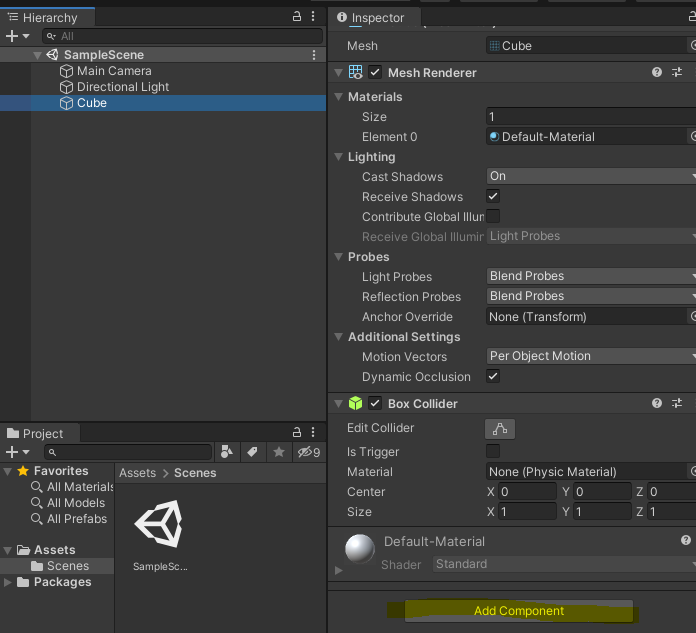
유니티 Component 장착 방법: AddComponent
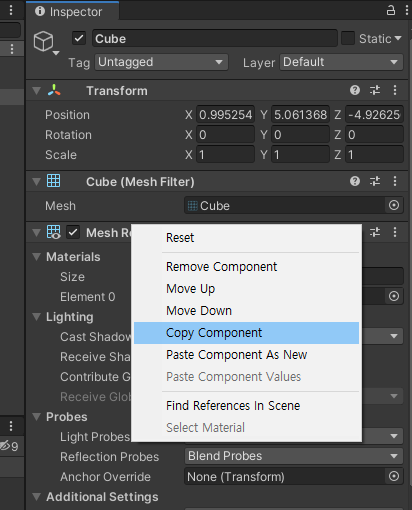
유니티 Component 복붙 방법: 원하는 Component 우클릭 > Copy Component 후 원하는 곳에 Paste Component As New
유니티 Component 값 복붙 방법: 원하는 Component 우클릭 > Copy Component 후 원하는 곳에 Paste Component Values
참고로 이름 변경 단축키는 f2이다
그런데 C# 클래스는 생성하고 클래스 이름 변경을 유니티에서 f2로 변경하더라도
비주얼스튜디오에는 반영이 안된다
그렇기에 비주얼스튜디오에서 직접 수동으로 변경해야 한다
'게임 엔진 - 유니티 > [루키스] 유니티' 카테고리의 다른 글
| [유니티 Note] 섹션 3-2 (0) | 2025.06.24 |
|---|---|
| [유니티 Note] 섹션 3-1 (0) | 2025.06.24 |
| [유니티 Note] 섹션 2-3 (0) | 2025.06.23 |
| [유니티 Note] 섹션 2-1 (0) | 2025.06.23 |
| [유니티 Note] 섹션 1 (1) | 2025.06.23 |

